 Agent Auto-Continue
 Guide
When the Claude limit resets, and how to pick up right then
Published
Claude Code just stopped with You've hit your session limit · resets 3:45pm.
That time is your answer: Claude Code blocks requests until the reset shown in the message.
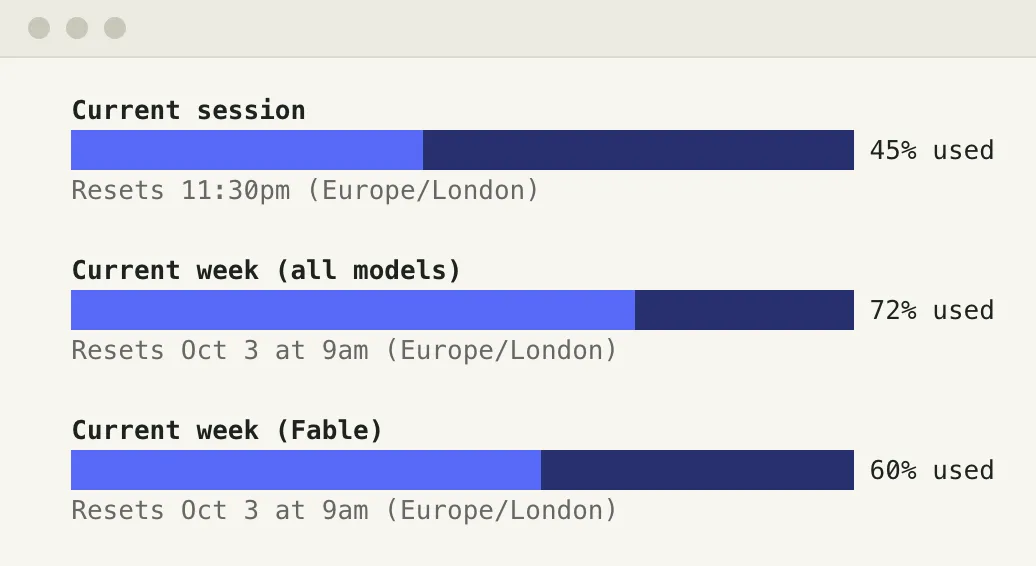
For both windows at once, run /usage, which shows your plan limits and when they reset.
Where to read it
| Where | What you get |
|---|---|
| The limit message | The reset time, like resets 3:45pm, with a day for the weekly one, like resets Mon 12:00am |
| The warning before it | You've used 85% of your session limit · resets 3:45pm |
/usage | Each plan limit and when it resets |
| Settings > Usage on claude.ai or in Claude Desktop | Time left in the session and when the weekly limit resets |
| A custom status line | resets_at per window, in Unix seconds (Pro and Max only) |
Those times are the docs’ examples; yours will differ.
Two windows, both counting
- There’s a rolling five-hour window and a weekly seven-day one.
- The weekly one resets at a fixed time each week assigned to your account, the same day and time however you use it (Max works the same way).
- Usage counts against both at the same time, so one heavy burst can use up the week before the five hours are up.
Picking up right then
- Leave the session open. Since v2.1.234, Claude Code waits and picks the task up after the reset by itself, on by default with a claude.ai subscription. The Claude Code page covers what it skips.
- A weekly reset days away.
A reset more than 24 hours out won’t start a wait on its own.
Claude Code shows its usage-limit menu instead (or run
/rate-limit-options); pick Wait here, then continue automatically and it counts down anyway. - Session closed, or you want to say something specific. Agent Auto-Continue is a free macOS menu-bar app whose When free option sends your message once the limit lifts, 5 seconds after a known reset by default. “Run the tests and fix what fails” beats a bare Continue (what to say).
How the app sees the limit
For Claude Code the app infers the limit rather than being told it. It uses Claude Desktop’s usage samples if one is under 20 minutes old, otherwise the newest limit message in your recent transcripts, with the reset time when that message states one. The Claude Code session has to be closed when the message goes out, since a second writer would fork it.
One honest note
Anthropic’s docs don’t say when the five-hour window starts (checked 2 October 2026).
Plenty of sites will tell you confidently that it starts with your first message.
So read the time from /usage or the limit message instead of working it out.
The app doesn’t work it out either. It only knows a reset time when a limit message in your transcripts states one, and a limit it sees without one doesn’t block a send, so the message can go out and hit the limit again. The app then waits for the reset that new limit message names, or 15 minutes if it names none, and doesn’t count that turn.
Agent Auto-Continue is an independent project. It is not affiliated with, endorsed by, or supported by T3 Tools, Anthropic, OpenAI, or any other agent vendor. Product names are trademarks of their respective owners and are used only to describe compatibility.
Logo moon: Albrecht Altdorfer, The Battle of Alexander at Issus (detail of the crescent), 1529. Alte Pinakothek, Munich, inv. 688. Public domain scan, Google Art Project via Wikimedia Commons.